


Comparison chart design starts with a fair comparison: the same criteria, units and conditions for every option. Use a table for mixed facts and a bar chart for one numeric measure. Build the comparison below, open the access notes and check whether the cheapest option meets the actual requirements.
What should your comparison chart help someone decide?
Write the decision before choosing the layout. “Compare venues” leaves too much open. “Find a room for 30 people, for four hours, within a USD 500 room-hire budget, with step-free access to the entrance and main room” gives each column a job.
The following comparison table is a working template. Every venue and fact in it is fictional. We built it to show how a lower price can distract from a requirement the cheaper option fails.
| Venue | Room hire (USD, 4 hours) | Seats | Step-free access |
|---|---|---|---|
| Alder Hall | $480 | 40 | Yes [Entrance and main room have a step-free route.] |
| Birch Studio | $360 | 24 | Partial [Main room is step-free; toilets are upstairs.] |
| Cedar Loft | $420 | 32 | Unknown [Access route has not been confirmed.] |
| Delta Garden | $300 | 28 | No [Entrance has steps; no alternative route supplied.] |
Sort the room-hire column. Delta Garden comes first at USD 300, but it seats 28 and has steps. Alder Hall costs USD 480, seats 40 and meets the access requirement stated in this example. Cedar Loft has enough seats, but its access route still needs confirmation.
That gives you a choice and a follow-up question. It doesn’t establish that Alder Hall is the best venue for every event. For a real booking, check toilets, evacuation arrangements and individual access needs separately.
How do you make the options comparable?
Give every option the same measurement basis before placing values in a comparison chart. A four-hour room price and a full-day price answer different questions, even when both cells display dollars.
Put the basis in the heading: “Room hire (USD, 4 hours)” identifies the currency and period. Keep seats in a separate numeric column. If a real quotation includes equipment or catering, show that condition where it can affect the decision rather than quietly comparing it with a room-only quotation.
Ask for a quotation for the same four-hour period. Don’t divide a daily rate by its hours unless the supplier confirms that the rate works that way. A minimum charge or package inclusion could make that calculation unsuitable.

Use consistent precision within each numeric column. The Government Analysis Function recommends aligned figures and a common level of precision for comparisons. Its table guidance also calls for units in headings unless the table title already supplies them.
For this example, whole dollars and whole seats are enough. Adding decimal places would suggest detail we haven’t supplied. A real cost comparison might require tax, date and billing-period checks; choose those rules before deciding which option looks cheapest.
If your data already lives in a spreadsheet, select only the relevant columns. Our Google Sheets guide covers the chart workflow there; you can also copy the cells into a comparison table.
How do you build and check the table?
Open the template with Open in the maker beneath the live comparison, or start with your own cells in the table maker. The template preserves its structured data. For pasted cells, inspect what the importer understood before accepting the result.
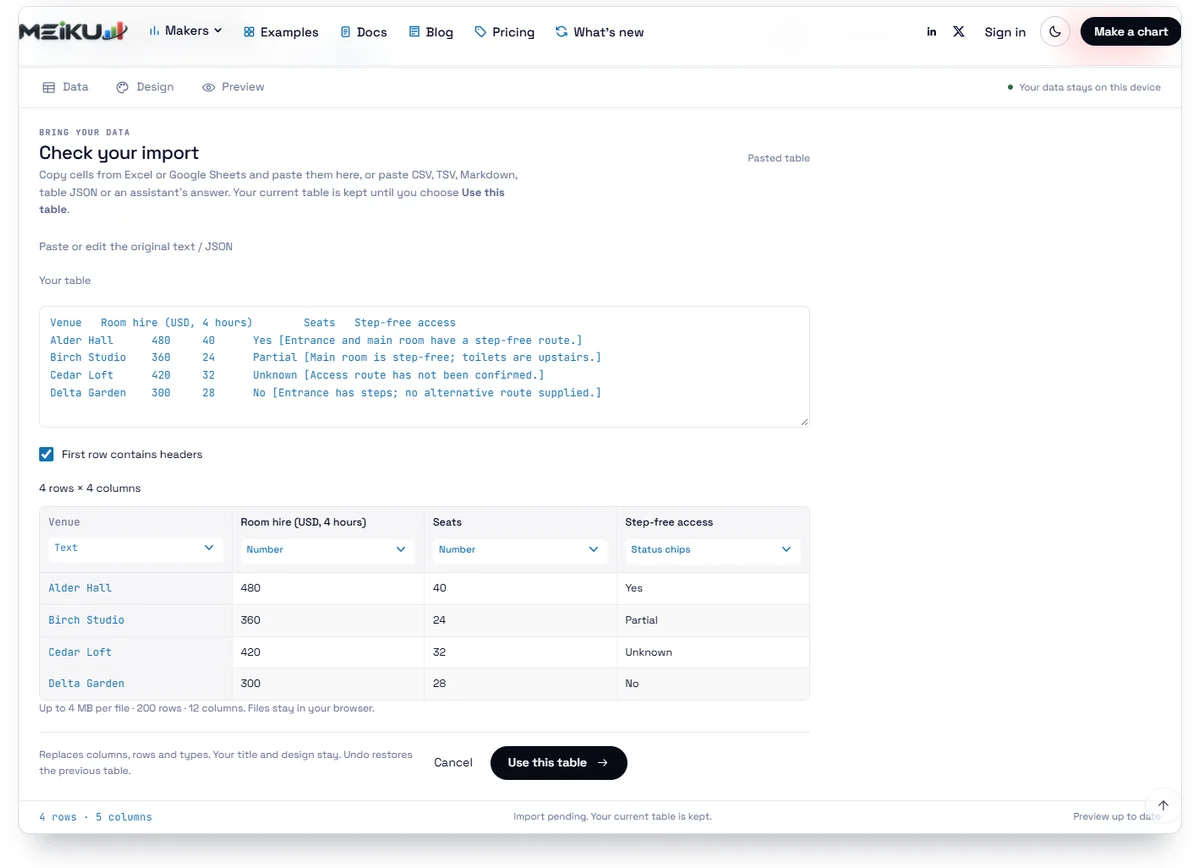
We tested these steps in the English interface on October 19, 2026:
- Click Paste table and paste the header row with the data rows. Keep First row contains headers checked for this example.
- Check the preview, then click Use this table. That action replaces the editor’s current rows and columns.
- Use the type menus beneath the column names: room hire to Money $, seats to Number, and access to Status chips. Check the venue column remains Text.
- Click Preview. Click the room-hire heading to sort by price, then open the + beside Birch Studio’s access status.
The sort put the fictional costs in ascending order: 300, 360, 420, 480. Birch’s note remained attached to Birch: “Main room is step-free; toilets are upstairs.” Sorting changed the reader’s view without changing the editor’s original row order.
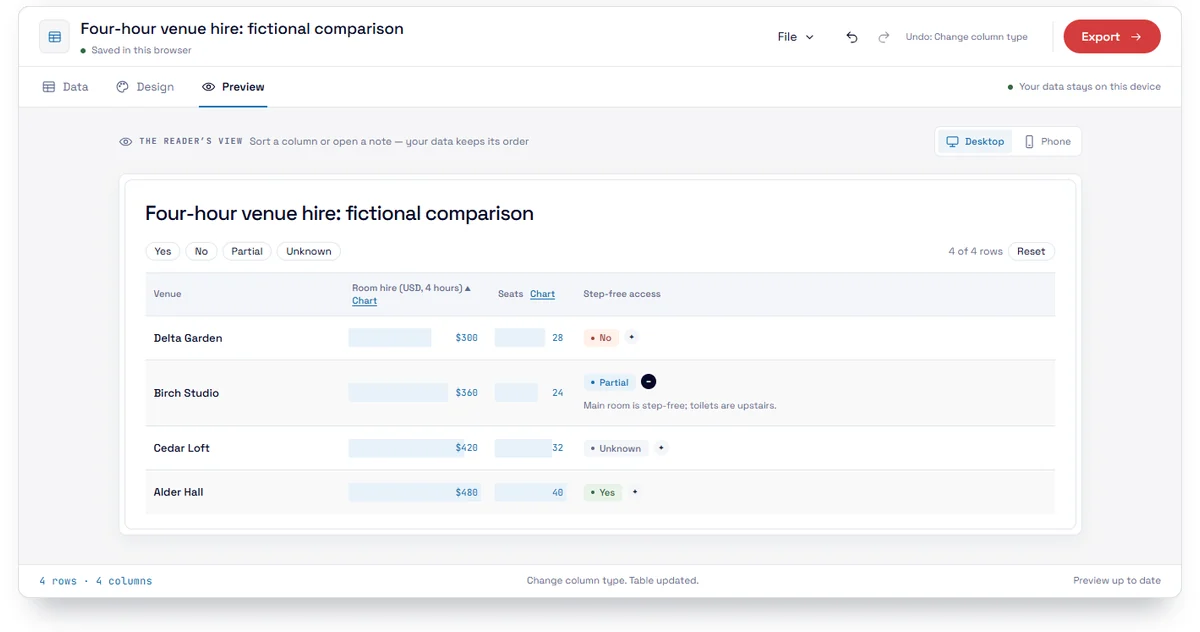
For your own pasted table, a note after a status can use square brackets, such as Partial [Main room is step-free; toilets are upstairs.]. Check the opened note after importing. A condition that disappears during the handoff can change what the comparison appears to promise.
What should unknown and partial values mean?
Label unknown information and state what the reader must confirm before relying on it. Cedar Loft’s Unknown means we haven’t confirmed the access route. It does not mean the route has been checked and found unsuitable.

Keep No, Unknown and Not applicable distinct. No records an absence. Unknown records a gap in what you know. Not applicable says the criterion doesn’t apply to that option. An empty cell makes the reader guess which state you meant.
Partial needs more explanation than a colored chip. Birch Studio’s note identifies the limitation, so the reader can decide whether it matters. For another comparison, a partial feature might mean a plan restriction or a condition on availability; name that restriction.
The access chip summarizes the venue, so read its note against your actual requirement. Birch’s toilet restriction goes beyond our narrow entrance-and-main-room check; it still fails our capacity requirement. Treating every Partial as an automatic rejection would hide that distinction.
An unanswered question belongs inside the comparison.
W3C’s guidance requires another way to convey information shown by color. Keep words such as Yes and Unknown visible beside the visual status. A green or gray cell by itself doesn’t explain the underlying fact.
Try it with your data
New on Meiku Charts
Any currency and your own units in every maker
Find any of 156 currencies by name or code, or put your own unit before or after the number. The Design panel is also shorter.
See what changed →When is a bar chart the better choice?
Use a bar chart when the comparison asks about one numeric measure across categories. Here, the narrower question is how the four-hour room-hire costs differ. Keep the mixed-data table nearby, because the bars don’t show capacity or access.
| Label | Room hire |
|---|---|
| Delta Garden | $300 |
| Birch Studio | $360 |
| Cedar Loft | $420 |
| Alder Hall | $480 |
Alder Hall costs USD 180 more than Delta Garden in this example. The chart makes that gap visible; the table explains why the cheaper option doesn’t meet the brief. Neither view should pretend to answer the other’s question.
ONS recommends a zero baseline for bar charts, whose lengths show the size of the values. Keep the same scale across the options. If you need other comparisons, our guide to types of graphs explains the alternatives, and the bar chart examples show this format in context.
Try changing the costs below. The costs are in USD for the same four-hour hire period. Editing this exercise redraws its own chart; the main table and the preceding bar chart stay unchanged.
Try it with your data
| Label | Value |
|---|---|
| Delta Garden | 300 |
| Birch Studio | 360 |
| Cedar Loft | 420 |
| Alder Hall | 480 |
How do you make it readable on a phone?
Check a comparison chart at the width where someone will read it, with its longest label and most restrictive condition visible. Shrinking the whole desktop table into an image makes the text smaller without solving the reading problem.
Table Studio’s Phone control previews a narrower reader view. Inspect it, then check the result on the destination page. This article’s main table uses cards on narrow screens so each value keeps its field label. That layout is a setting of this table, not something the Phone button automatically applies to every import.
Start with Open in the maker beneath the main table to reuse its card layout. If you build a different table from pasted cells, check the narrower view again rather than assuming it has the same settings.
Open an access note on the smaller screen. Confirm that the venue name and the condition still belong together. Also check the table by keyboard: can you reach the sort and note controls, operate them and see where focus is?
W3C’s table tutorial explains why programmatic header relationships matter for assistive technology. Retain real table structure when publishing on the web. Our browser checks demonstrate the actions described here; they don’t replace a full accessibility audit with the tools your readers use.
How do you share and maintain the result?
Choose the handoff according to what the next person needs to do. An editing link reopens the comparison in the maker. An embed displays it in a web page. Table JSON is the structured data file you can keep for a later revision.
In Table Studio, click Export to find Copy embed, Copy editing link and Download JSON. We downloaded the file and opened a copied editing link in a new tab; it restored the title and the original authoring order, rather than the price-sorted preview. Inspect your own result after that handoff, including its notes.
An editing link includes the table data. An embedded table also supplies data to the reader’s browser. Keep confidential information out of a public comparison, even if you haven’t displayed every detail prominently.
For embedding, your website editor must accept the supplied HTML and script. The embed documentation explains that setup. Copying cells from Google Sheets doesn’t connect the published table to the spreadsheet. After an edit, copy a fresh embed, replace the old snippet on your page and check the rendered result. Generate and send a new editing link too; an earlier link contains the earlier data.
Table Studio’s Export panel has no direct PNG download. If you need a picture of one numeric comparison, open the bar chart in the bar graph maker and use its image export. Keep the conditions available beside it. A saved picture won’t preserve sorting or an expandable note.
Before sharing the finished comparison chart, write down who will check it next and when its facts were last confirmed. For this teaching example, those facts are invented. For a real decision, that check is part of maintaining the comparison.
Comments